Workflow Action - Separate Messages and InMail Actions
Messages and InMail now have separate workflow actions for clearer setup and better tracking.
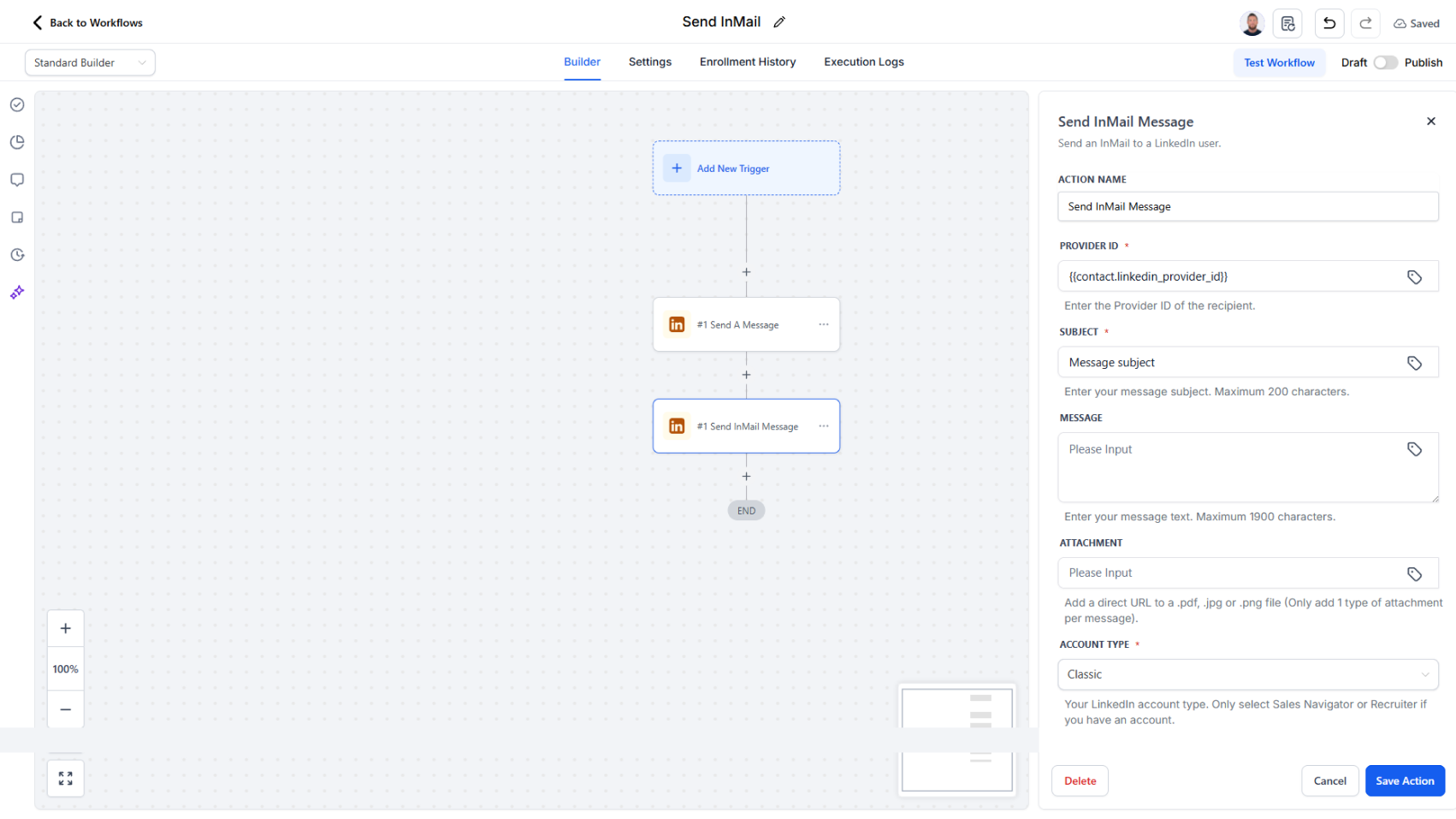
LinkedIn messages and InMail now have their own dedicated actions instead of sharing one.
What changed:
Previously, a single "Send Message" action handled both regular messages and InMail, which made it unclear which fields applied to which communication type. Now each has its own action with a simplified field set.
What each action does:
- Send A Message — Send direct messages to existing LinkedIn connections. Configure message content and delivery timing.
- Send InMail Message — Send premium InMail outreach using LinkedIn's InMail feature. Simplified setup with only InMail-relevant fields.
Workflow logs now distinguish between "Message Sent" and "InMail Sent" events, so you can easily track which communication type was executed.
Why it matters:
Reduces configuration errors by hiding irrelevant fields. Makes debugging simpler—you can see exactly which action ran and why. Clearer logs mean better monitoring and reporting.
What you need to do:
If you have existing workflows using InMail, replace the old "Send Message" action with the new "Send InMail Message" action. Search your workflows for InMail to find any that need updating.