Duplicate Contact Detection in LinkedIn Importer
Avoid importing duplicate contacts. The LinkedIn Importer now shows which contacts are already in your CRM and automatically skips them when you select all—preventing duplicate enrichment and outreach.
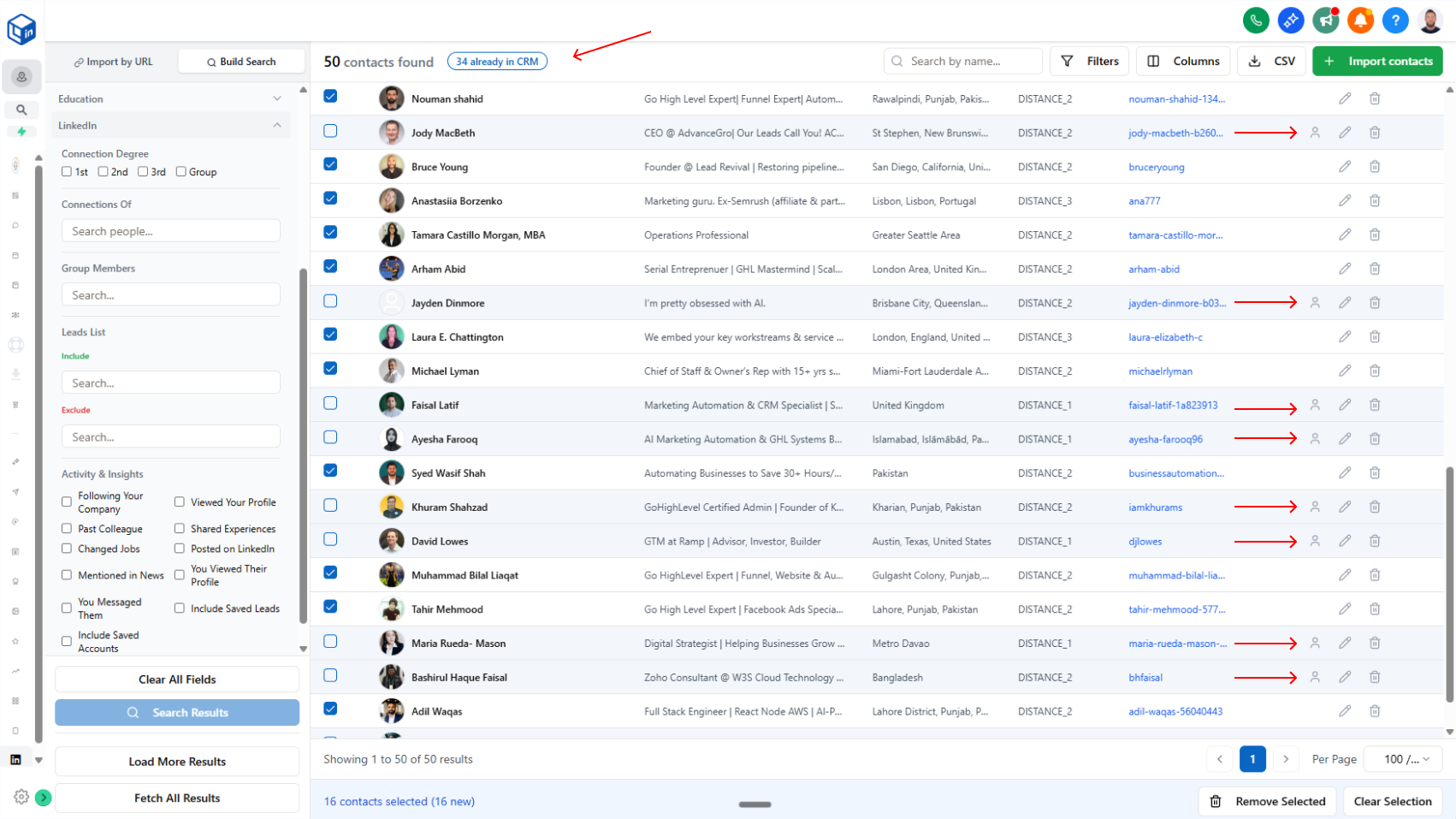
Stop importing contacts you already have. Instantly see which leads are already in your CRM.
What it does:
When you search for LinkedIn profiles using the LinkedIn Importer, the system now checks your CRM and highlights any contacts that already exist. A badge at the top shows the exact count (e.g., "34 already in CRM"), and duplicate rows are highlighted with a profile icon on the right.
- Duplicates are clearly marked and visually highlighted
- Badge shows exact count of contacts already in your CRM
- When you select all, only new contacts are selected (duplicates automatically skipped)
- You can manually check duplicates if you want to update their data with new information
Why it matters:
No more accidental duplicate imports. You avoid enriching the same contact twice, sending duplicate outreach, or wasting credits on contacts you already own. Full control stays with you—skip duplicates by default, but override when you need to refresh contact data.
How to use it:
Search for LinkedIn profiles in the LinkedIn Importer. Review the badge showing duplicates, then select all to import only new contacts. Check any duplicate rows manually if you want to update them.