New Automatic Contact Creation Settings
Automatically add new LinkedIn connections and message senders to your CRM with two toggles—no more contact creation workflows required.
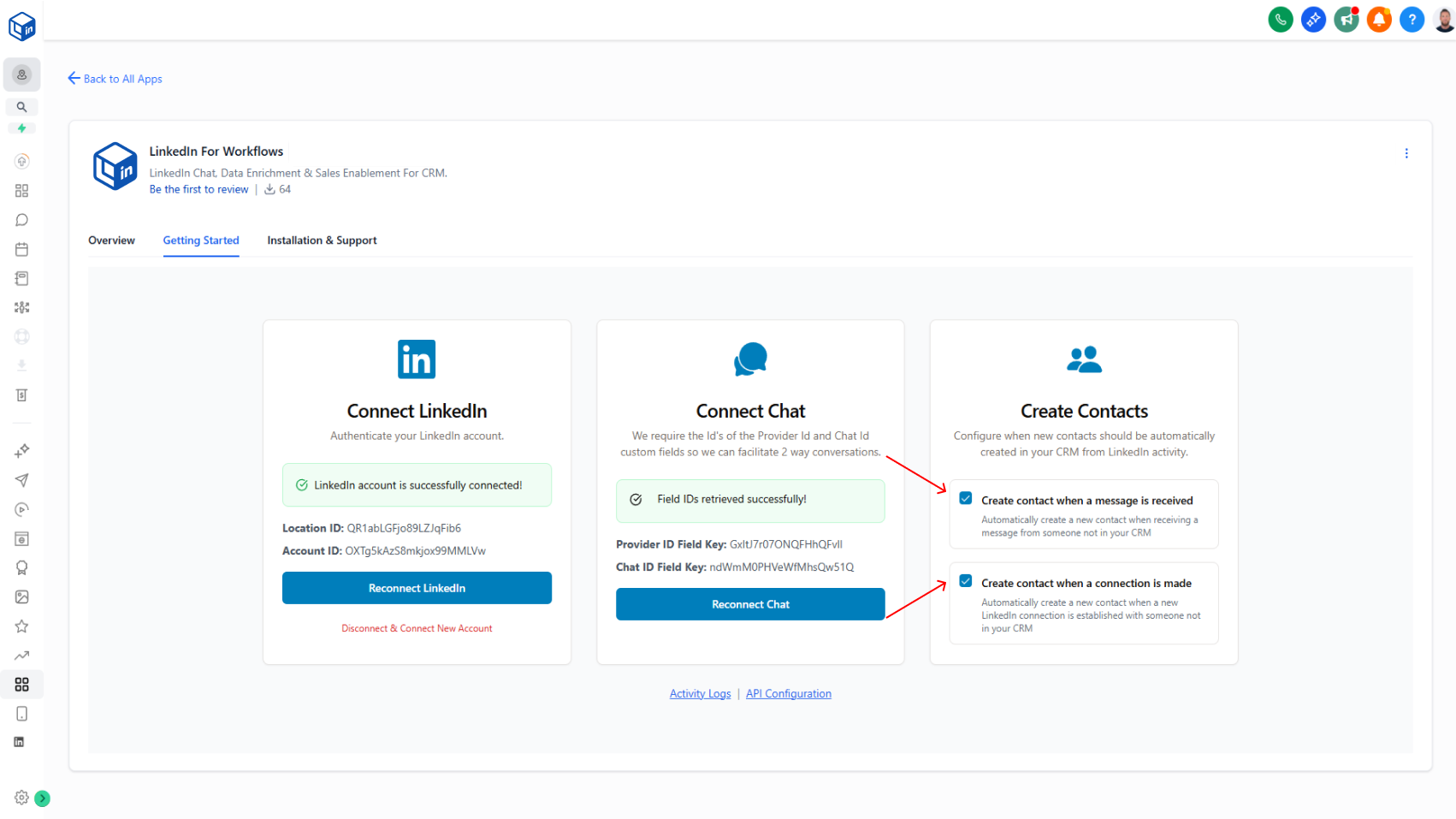
Automatically add new LinkedIn connections and message senders to your CRM with 2 simple toggles on the Getting Started Page.
What it does:
When someone connects with you on LinkedIn or sends you a message, they're now automatically added to your CRM without you having to manually create them:
- When a new person messages you → they're auto-added with their name, LinkedIn profile ID, and chat ID
- When you accept a new connection → they're auto-added with their name and profile ID
- Both toggles are off by default (you control what gets created)
- Only creates contacts if they're not already in your system
Why it matters:
Saves you time on manual data entry. Your CRM stays fresh with new contacts automatically, and you don't have to set up complicated "Create Contact" workflow steps anymore.
Migrating from workflows:
If you're already using "Create Contact" actions in your 1A: New Connection and 1B: New Message workflows, you can simplify your setup:
- Enable the relevant toggle(s) on the Getting Started tab
- Delete the "Create Contact" steps from your workflows (no longer needed)
- The automatic toggles will handle contact creation from now on
How to use it:
Side Menu → App Marketplace → Installed Apps → LinkedConnector → Getting Started tab