Agency Management Dashboard

We're thrilled to introduce the Agency Management Dashboard, a centralized command center that gives agencies complete visibility and control over all their subaccounts' LinkedIn integrations from a single interface.

Daniel Marr

Overview

Managing LinkedIn for Workflows across multiple subaccounts just got significantly easier. The Agency Management Dashboard eliminates the need to log in and out of individual subaccounts by consolidating critical information, activity monitoring, configuration checks, and support resources into one comprehensive view.

How It Works

The dashboard is organized into four key tabs:

1. Subaccounts

View all your installed subaccounts at a glance with essential details including:

  • Installation date
  • Connected LinkedIn account
  • LinkedIn account type (Premium, Sales Navigator, Recruiter, etc.)
  • LinkedIn connection status
  • Last activity timestamp

Click on any subaccount to navigate directly to its LinkedIn for Workflows settings, or open a detailed modal to see:

  • LinkedIn connection details
  • App configuration status (Provider ID and Chat ID field mappings)
  • Visibility settings (Create Contact on Message Received, Create Contact on New Connection)
  • Trigger activation status with direct links to workflow configurations

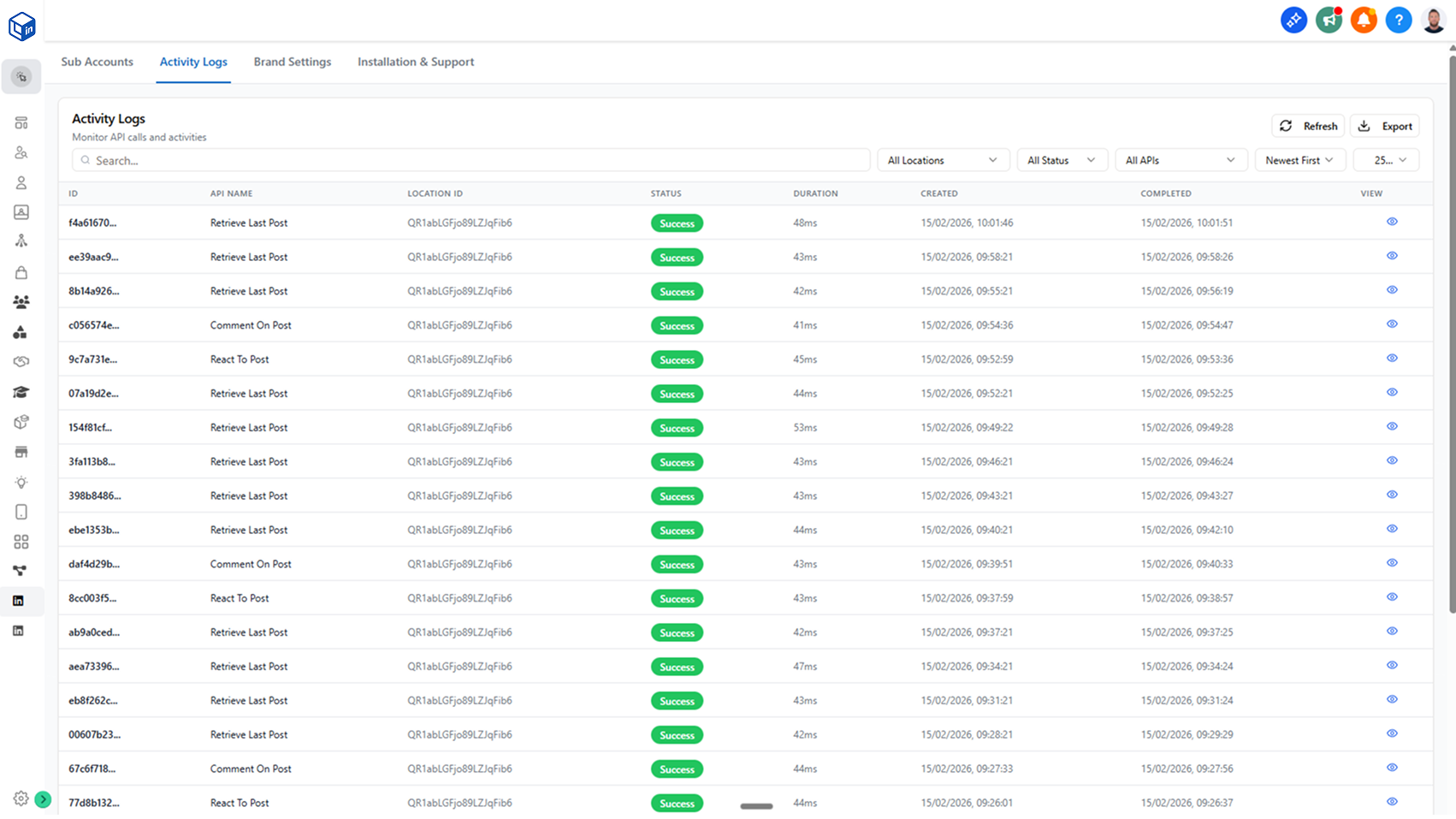
2. Activity Logs

Monitor workflow activity across all subaccounts with powerful filtering options:

  • Filter by specific subaccount location
  • View all workflow actions (Send Message, Send Connection Request, Retrieve User Profile, etc.)
  • Filter by status: Success, Failed, Queued, or Rate Limited
  • Filter by specific API workflow actions
  • View 30 days of activity history
  • Export activity logs for reporting and analysis
  • Quickly identify failures and understand why workflows aren't executing as expected

3. Brand Settings

Customize the LinkedIn for Workflows interface with basic white label branding:

  • Set your brand's primary color
  • Customize button colors
  • Update text and branding elements
  • Applies to all LinkedIn for Workflows pages across your agency

4. Installation and Support

Access all the resources you need in one place:

  • Getting started video
  • Links to the getting started guide
  • Configuration video tutorials
  • Complete documentation
  • Direct contact support access

Why This Matters

  • Save Time: Manage all subaccounts from one centralized dashboard instead of logging in and out of individual locations
  • Ensure Consistency: Quickly verify that all subaccounts have LinkedIn accounts connected and properly configured
  • Prevent Issues: Check that Provider ID and Chat ID fields are correctly mapped across all subaccounts
  • Troubleshoot Faster: Identify workflow failures across your entire agency portfolio and understand why actions are failing
  • Monitor Activity: Track LinkedIn automation activity, rate limits, and usage patterns across all subaccounts
  • Maintain Compliance: Export activity logs for reporting and ensure your agency stays within LinkedIn's usage guidelines
  • Brand Your Solution: Apply your agency's branding to create a more cohesive white label experience

Getting Started

The Agency Management Dashboard is available to all agency-level accounts today. Simply add the custom menu link to your agency dashboard to get started.

https://api.linkedinforworkflows.com/agency

Note: This feature requires a white label domain. If you're not currently on a white label domain, contact support for a unique menu link for setup.